As a Reseller, you will have full access to all of the details of your clients’ organization. Each organization has three types of users:
- Organization Admin – Is the general admin of all divisions
- Division (region/sector) Admin – Administrator of the division
- Division (region/sector) User – User of the division
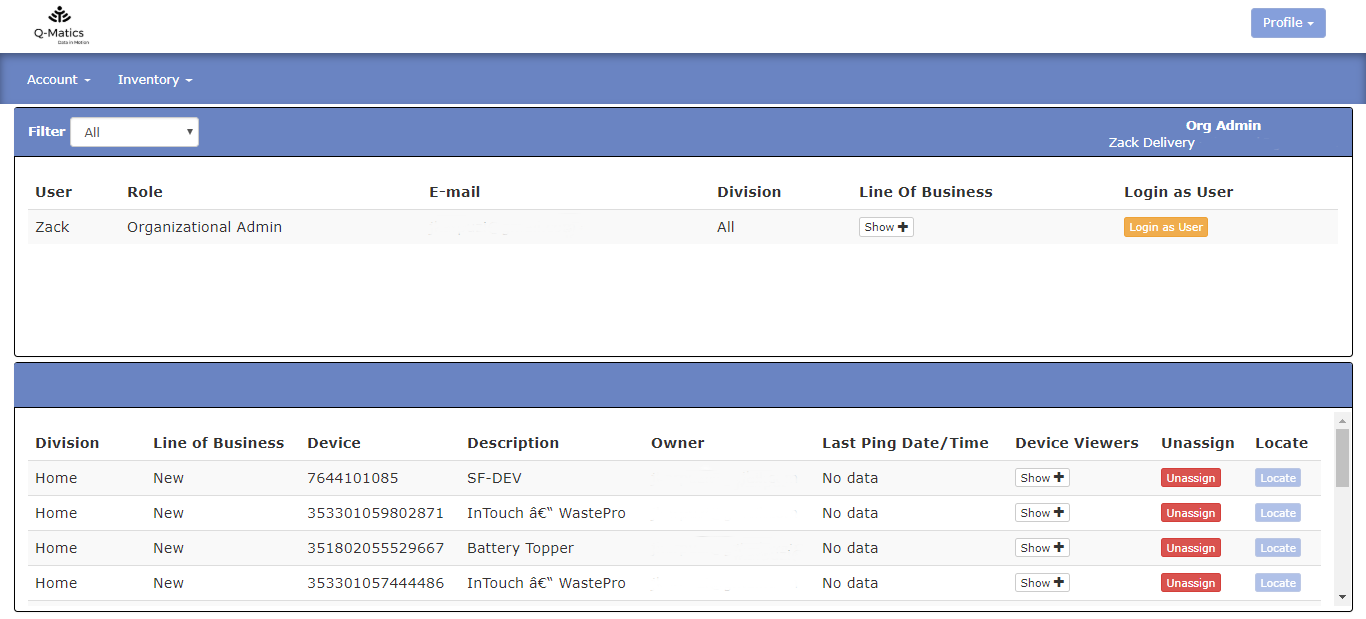
- Division (region/sector) – Shows the division for which the device has been assigned too
- Line of Business – Shows the business type for which the device has been assigned too
- Device – Shows the assigned device
- Description – The name of the Device
- Owner – The customer which owns the organization
- Last Ping Date/Time – The last time which the assigned device was active
- Device Viewers – Shows who’s view the device from the organization
- Unassign – Enables you to unassign the assigned device
- Locate – Enables you to locate where the device is at the moment
You can filter your divisions by clicking on the filter drop-down located on the upper left-hand side and selecting the division you want to see. Each organization can have one or more divisions and each division can have one or more lines of business (business types).
Last Update: March 20, 2020
March 20, 2020 19 jusuf Reseller Guide
Total 0 Votes:
0
0
Tell us how can we improve this post?
Log In is required for submitting new question.